 Verbiform
Cloud or on-device
Every recording is processed one of two ways: in the cloud, for the most accurate models, or entirely on your device, so nothing is sent off to be processed. You choose — and you can see exactly what runs where.
Cloud, when you want accuracy
The cloud uses the most accurate models. Audio and text are sent, processed, and then deleted — never used to train anyone’s models. It’s the default while you’re online, and it’s what makes unfamiliar names and long recordings come out clean.
On-device, when you want privacy
Prefer that your recordings aren’t sent off to be processed? Switch to on-device and transcription runs right in your browser — nothing is uploaded for processing. It’s free and unlimited, a little less accurate on unfamiliar names, and it keeps working with no signal at all. (On-device auto-fill needs the local model installed first.)
Make the choice once, in Settings → Privacy
One setting controls it. Pick “Use the cloud when online” or “This device only,” and every new recording follows your choice until you change it.
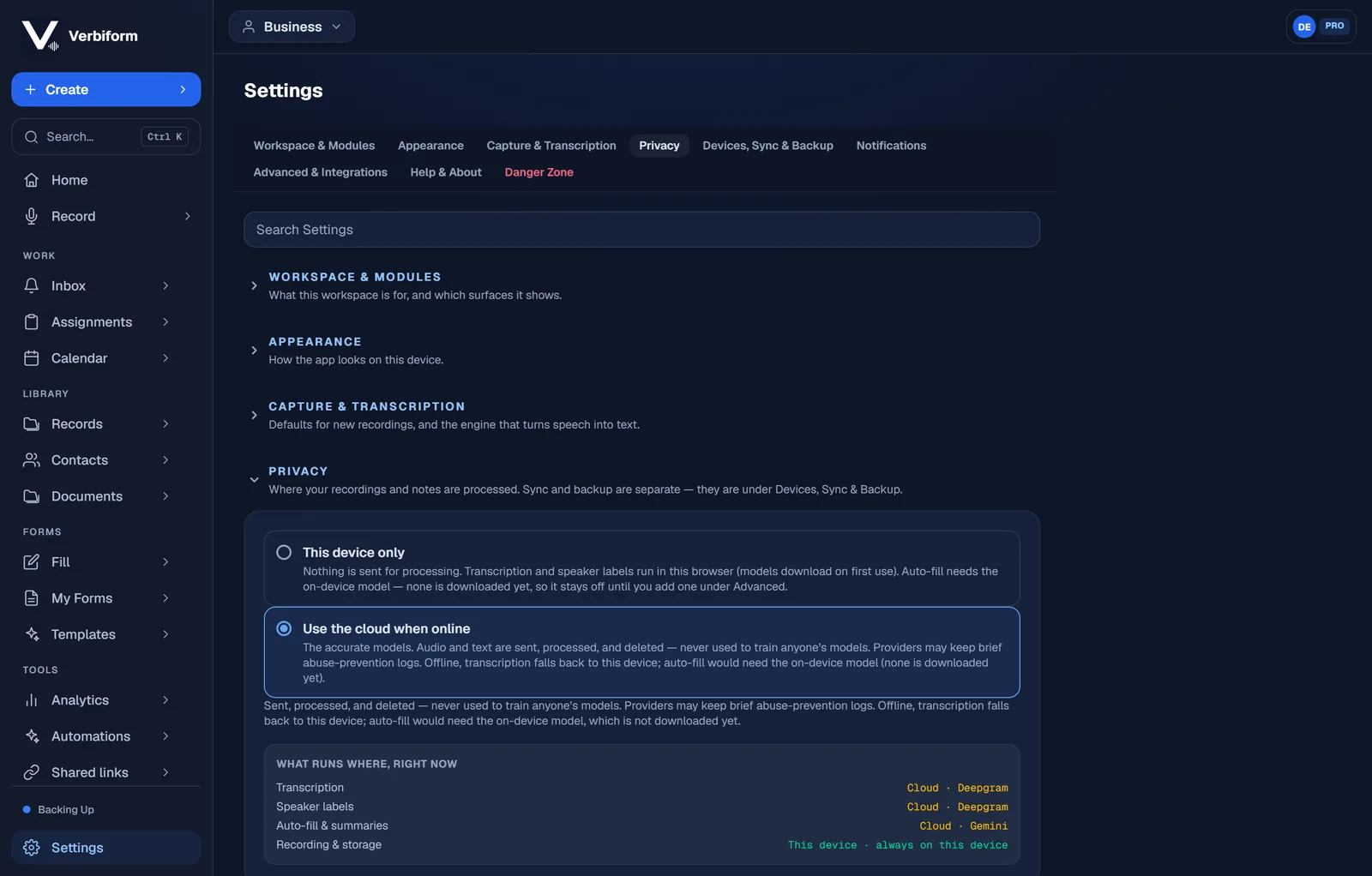
See exactly what runs where
The “what runs where” table spells it out for the mode you’re in — transcription, speaker labels, auto-fill, and storage. Your recording is always stored on your device first; backing it up to your account is a separate switch (under Devices, Sync & Backup), so processing and backup are two independent choices.